
Last Updated: October 26, 2026
Quick Summary
A point of sale credit card transaction happens when a customer pays with a card in person at your checkout, using a card reader connected to your till. You need a POS terminal, a card reader that accepts chip and tap payments, and a payment processor to move the money. The customer taps, dips, or swipes, and the payment is approved or declined within seconds.
- Confirm the reader accepts EMV chip cards and tap payments, including mobile wallets.
- Choose countertop, portable, or wireless terminals based on your counter space and staff needs.
- Authorization holds funds, while settlement moves them and funding reaches your bank account.
- Use PCI-validated terminals and never store full card numbers, CVVs, or track data.
- Compare processors on effective rate, meaning total fees divided by total card sales.
Table of Contents
- What a Point of Sale Credit Card Transaction Is
- Equipment You Need: POS Terminal, Credit Card Reader, and Software
- Step-by-Step: Taking a Card Payment at the POS
- How Card Transactions Are Authorized, Secured, and Settled
- Credit Card Processing Fees and a Worked Cost Example
- POS Debit vs. POS Credit: How They Differ at Checkout
- Troubleshooting Declined, Offline, and Failed Payments
- Choosing a Setup That Fits Your Transaction Volume
- Frequently Asked Questions
What a Point of Sale Credit Card Transaction Is
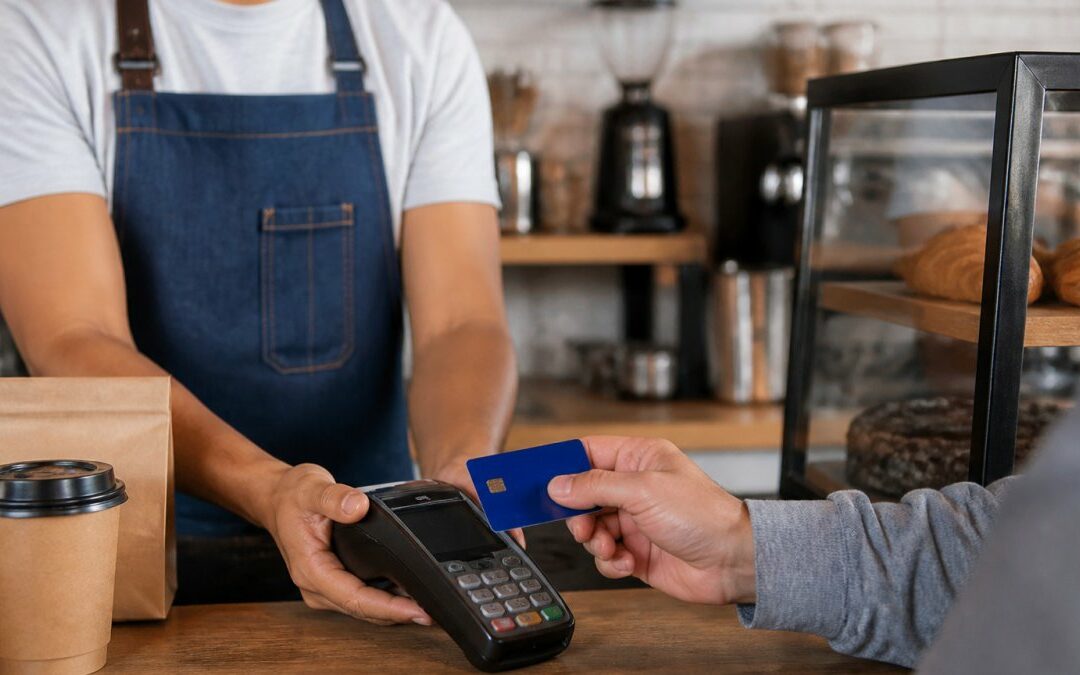
A point of sale credit card transaction happens when a customer pays with a card in person at your checkout counter, using a card reader connected to your till.
This is a card-present transaction: the card and reader are physically together, unlike an online sale. Card-present payments generally carry lower fraud risk and lower processing costs than card-not-present sales.
Most owners start with one question: what do I need to take a card?
Equipment You Need: POS Terminal, Credit Card Reader, and Software
A typical setup has three pieces. The POS terminal is the screen and computer where you ring up sales. The credit card reader accepts chip, tap, and swipe payments. The software runs the sale and sends data to your processor.
Some businesses use an all-in-one device; others pair a tablet with a standalone card reader. The choice depends on counter space and how many staff ring up sales at once.
Here is what to check before buying:
- Chip and contactless support: Confirm the reader accepts EMV chip cards and tap payments, including mobile wallets.
- Connection type: Ethernet, Wi-Fi, or cellular. A backup connection helps if your internet drops.
- Software fit: Make sure the POS software handles your sales, tax rules, and reporting needs.
- Support access: Ask how quickly someone can help when a terminal fails during a busy shift.
Countertop, Portable, and Wireless Terminal Options
Countertop terminals stay in one place and suit cafes, retail counters, and restaurants with a fixed register. They are usually the most stable option.
Portable terminals run on battery and move with the server or cashier, suiting table service, farmers markets, or delivery drivers collecting payment at the door.
Wireless terminals connect over Wi-Fi or cellular data instead of a cable, but depend on signal strength. Test the signal where you plan to use them before committing.
Step-by-Step: Taking a Card Payment at the POS
Most card payments follow the same general steps, whatever terminal you use:

- Ring up the sale. Add items in your POS software and confirm the total, including tax.
- Choose the card payment option. Select credit or debit on the screen so the terminal knows the transaction type.
- Prompt the customer. Ask them to insert, tap, or swipe their card, or to tap a phone or watch.
- Keep the card in the customer’s view. Follow your store policy and stay close to the reader while the card is read.
- Wait for approval. The terminal returns approved, declined, or asks for a PIN or signature.
- Print or send the receipt. Give the customer a paper or digital receipt.
- Close the transaction. Confirm the sale is complete in the system before the next customer.
Watch out: Do not hand a card back before the terminal finishes. Leaving the transaction open can create duplicate charges or confusion at end of day.
How Card Transactions Are Authorized, Secured, and Settled
A card payment moves through four stages: authorization, capture, settlement, and funding. Security runs alongside all four. Understanding each stage helps you explain delays to customers and protect your business.
Authorization
When the customer taps, dips, or swipes, the terminal sends an authorization request through your processor to the card network and issuing bank. The issuer checks whether the card is valid, funds are available, and fraud rules flag the transaction, then responds in seconds as approved, declined, or a referral requiring a call. An approval places a hold on funds; it does not yet move money.
Capture and Settlement
At the end of the day, you batch your approved transactions and send them for capture. The processor submits the batch to the networks, which coordinate the transfer of funds between the issuing bank and your acquiring bank. For a deeper explanation of these stages, see what authorization and settlement involve. Settlement is when the transaction becomes a real receivable; funds then post to your bank account, typically within one to three business days.
Security: What You Are Responsible For
Card security is shared between you, your processor, and the card networks, but your part is real.
- Use PCI-validated terminals and payment software. If the terminal encrypts card data at the point of entry and never stores the full card number, your PCI scope is much smaller. Ask your provider for the device’s PCI validation listing.
- Never store full card numbers, CVVs, or track data on paper, in a spreadsheet, or in your POS unless the system is designed and validated for it. Most small businesses should not store card data at all.
- Complete the annual PCI self-assessment questionnaire your processor provides.
- Keep terminals physically secure and restrict who can access them. Report lost or tampered devices to your processor immediately.
Encryption, Tokenization, and EMV
Encryption scrambles card data in transit so it cannot be read if intercepted. Tokenization replaces the card number with a unique token useless outside your payment system, so a breach exposes far less. EMV chip generates a unique cryptogram per transaction, so a copied chip cannot be reused. Contactless and mobile-wallet payments use similar dynamic data, so tap payments are generally as secure as chip for card-present sales.
Chargebacks and Fraud Prevention
A chargeback happens when a customer disputes a charge with their issuing bank, which reverses the transaction and notifies your processor, who notifies you. Common card-present triggers include an unrecognized merchant name, a duplicate charge, or a returned item without a refund.
Practical fraud controls for card-present businesses:
- Use a clear statement descriptor so customers recognize the charge and do not dispute it by mistake.
- Match the card to the customer when policy allows, and follow the terminal’s prompts for signature or PIN.
- Keep receipts and transaction logs for the period your processor recommends, often 12 to 18 months.
- Watch for unusual patterns, such as repeated declines followed by a different card, or a customer rushing the cashier during a manual entry.
- Respond to chargeback notices quickly. Missing the response window usually means the dispute is lost by default.
If a terminal is lost or a device is suspected of tampering, stop using it and contact your processor before processing another sale. A compromised terminal can expose card data.
Authorization holds the funds, settlement moves them, and funding puts them in your bank. Security is not just the processor’s job.
Credit Card Processing Fees and a Worked Cost Example
Processing fees can include multiple components.
1. Interchange.
2. Assessments.
3. Processor markup.
The Three Pricing Models You Will See
- Flat rate: One percentage plus a per-transaction fee for every card, regardless of type.
- Interchange-plus: You pay actual interchange and assessments plus a fixed markup.
- Tiered: Transactions are grouped into “qualified,” “mid-qualified,” and “non-qualified” buckets with different rates. The tiers are hard to predict, and a card that does not meet the processor’s qualification rules can fall into a higher-cost bucket. To compare how these structures differ, see flat fee vs interchange-plus processing fees.
Ask for a sample statement and confirm which model you are quoted.
A Worked Example Using Hypothetical Numbers
Split that 2.6% into its parts: roughly 1.8% interchange, 0.15% assessments, and 0.65% processor markup. On the $10,000 month that is about $180.00 to the issuing banks, $15.00 to the networks, and $65.00 to the processor. These are illustrative, not quotes; your actual mix depends on the cards your customers use.
Costs Beyond the Percentage
- Per-transaction fees: Often $0.05 to $0.30 per sale on top of the percentage. On high-ticket sales this is minor; on $5.00 coffee sales it can dominate the effective rate.
- Monthly and statement fees: Ask whether they are waived.
- Equipment costs: Some providers bundle a terminal; others lease or sell hardware.
- Chargeback fees: Typically $15.00 to $25.00 per disputed transaction, plus the risk of losing the sale amount if the dispute is not rebutted.
- PCI compliance fees: Some processors charge a monthly or annual fee for PCI compliance support. Confirm whether it is included.
- Batch and settlement fees: Less common now, but still appear on some legacy statements.
Settlement Timing and Why It Matters
Authorization is not the same as funding. Authorized sales are batched and sent for settlement. Plan cash flow around settlement timing, not the moment the customer taps.
Compare quotes on the same basis: ask each provider for the effective rate on your actual card mix over a recent month, not the advertised headline rate. The effective rate is total fees divided by total card sales.
Consumer Financial Protection Bureau guidance on payment card fees
Read more: Our breakdown of 7 hidden credit card processing fees small businesses miss walks through the charges that most often catch owners off guard.
The table below sums up the main fee components and pricing models covered in this section.
| Item | Value | Note |
|---|---|---|
| Interchange | Paid to issuing banks | Set by card networks |
| Assessments | Paid to card networks | Small fixed share of each sale |
| Processor markup | Set by your processor | Varies by pricing model |
| Per-transaction fee | $0.05 to $0.30 | Adds up on low-ticket sales |
| Chargeback fee | $15.00 to $25.00 | Per disputed transaction |
POS Debit vs. POS Credit: How They Differ at Checkout
At checkout, a debit card and a credit card look the same to the customer. The difference is how the money moves.
A POS credit transaction pulls from a line of credit; a POS debit transaction pulls directly from the customer’s checking account.
From the merchant side, both use the same terminal and steps. What changes is the fee and sometimes the routing. Ask your processor which option gives you the better rate for your card mix.
Troubleshooting Declined, Offline, and Failed Payments
Declines are common and not always a sign of a problem with your system. Start with simple checks.
Declined cards: Most declines come from the customer’s bank, such as insufficient funds or a fraud flag. Ask the customer to try another card or payment method. Do not repeat the same card many times in a row.
Offline terminal: Check your internet and power first.
Failed reads:
Local Credit Card Processing provides 24/7 customer support, so you can reach someone when a terminal problem hits during service.
Choosing a Setup That Fits Your Transaction Volume
The right setup depends on how many card sales you process each day. A small cafe with three terminals has different needs from a busy restaurant with a dozen servers.
Start by listing your daily card volume, number of registers, and whether staff need to take payment away from the counter.
Local Credit Card Processing offers free equipment and easy integration. Start with our get started today page to see the options that fit your counter and your sales volume.
Frequently Asked Questions
What is a point-of-sale credit card transaction?
A point-of-sale credit card transaction is a payment made in person, where the customer’s card is read at the checkout by a POS terminal or card reader. The terminal sends the card data to a payment processor, which requests authorization from the card issuer. If approved, the sale is recorded in your POS system and the funds are settled to your merchant account.
What equipment do I need to process credit card payments?
Local Credit Card Processing offers integration support, and you can check current details on its website.
How much does a POS credit card machine cost?
For current pricing, visit the Local Credit Card Processing pricing page.
Can a POS terminal process debit and credit cards?
Yes. Most modern POS terminals accept both debit and credit cards, along with mobile wallets and contactless payments. When a debit card is processed as POS debit, the transaction typically runs through a debit network and may require a PIN, while POS credit transactions run through card networks and usually need a signature or chip verification. Your processor determines how each card type is routed, so confirm that your terminal and processing agreement support every payment method you plan to accept.

Recent Comments