Last Updated: October 23, 2026
Quick Summary
To buy a payment terminal for small business use, match the hardware style to how you sell: countertop for fixed high-volume lanes, wireless for table service, mobile readers for off-site sales, and smart terminals for apps and reporting. Compare total cost of ownership, not sticker price, since transaction fees and monthly fees usually outweigh hardware. Confirm the device is unlocked and compatible with your POS and merchant account before you sign.
- Ask for every fee in writing, including hardware, transaction, monthly, incidental, and contract terms.
- A terminal you own outright with a competitive interchange-plus rate often beats a free terminal by year two.
- Mobile card readers are the cheapest entry point, often under $100, but slowest at high volume.
- Confirm the terminal is unlocked and integrates with your POS before buying to avoid double entry.
- Run a live test sale and a refund before your first customer arrives.
Table of Contents
- Why Buying a Payment Terminal for Small Business Matters in 2026
- The Best Payment Terminal for Small Business: Key Features to Compare
- Payment Terminal Costs: Hardware, Fees, and Total Cost of Ownership
- Mobile Credit Card Reader for Small Business: When a Phone or Tablet Makes Sense
- Payment Terminal Setup and Integration: From Unboxing to First Sale
- How to Choose a Payment Terminal by Business Type
- Frequently Asked Questions
Why Buying a Payment Terminal for Small Business Matters in 2026
Card acceptance is no longer optional for a local shop, cafe, or repair garage.
At Local Credit Card Processing, we work with owners who are tired of guessing at fees and hardware.
The stakes are practical. A terminal that drops its connection mid-rush costs you sales. A rate that looks low on a flyer can cost more over a year than the device itself.
The Best Payment Terminal for Small Business: Key Features to Compare
The best payment terminal for small business is the one that matches your counter space, your sales volume, and how your customers pay. Four hardware styles cover almost every small business, and each solves a different problem.
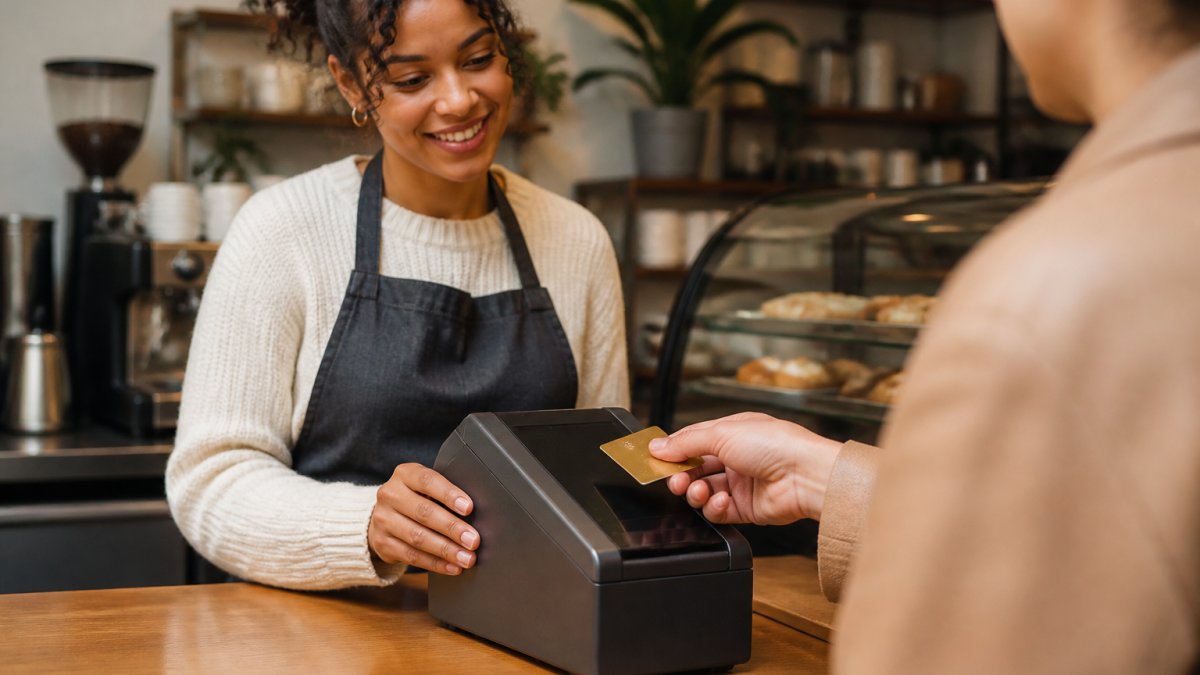
Countertop, Wireless, Mobile, and Smart Terminals
- Countertop terminal: Sits plugged in at a fixed register. Best for high-volume checkout lanes where the device never moves.
- Wireless terminal: Runs on Wi-Fi or a cellular connection with a rechargeable battery. Good for table service and pop-up counters.
- Mobile terminal: Pairs with a phone or tablet through a card reader attachment or app. Fits food trucks, market stalls, and mobile services.
Payment Methods and Mobile Wallet Acceptance
Every terminal you consider should accept EMV chip cards, magnetic stripe cards, and contactless tap, including NFC mobile wallets like Apple Pay and Google Pay. Confirm the device handles both credit and debit cards and prints or emails receipts. A terminal that cannot tap is a terminal your customers will notice.
Payment Terminal Costs: Hardware, Fees, and Total Cost of Ownership
The sticker price of the hardware is the smallest part of the cost. What matters is total cost of ownership: hardware, transaction fees, monthly fees, and setup, added up over two or three years. Most small businesses that feel overcharged did not pick a bad terminal, they picked a bad fee structure and only noticed it months later.
The Five Cost Layers
Every quote you receive is built from five layers. Ask for each one in writing before you compare anything.
| Cost Component | Typical Form | What to Ask | Why It Matters |
|---|---|---|---|
| Hardware | Buy outright, lease, or “free” equipment | Is the device unlocked, or tied to this processor? | A “free” terminal usually carries a higher rate or a long lease |
| Transaction fees | Interchange + processor markup + card network assessments | What is the effective rate on my average ticket? | Scales with every sale; the biggest long-run cost for most businesses |
| Monthly fees | Statement, gateway, PCI compliance, minimum-volume | Which of these are waivable, and at what volume? | Adds up even in slow months |
| Incidental fees | Chargebacks, batch fees, address verification, refunds | What triggers each fee, and how much is it? | Small line items that quietly erode margin |
| Contract terms | Length, auto-renewal, early termination | What is the exit cost if I switch? | Locks in your total cost for years |
What the Numbers Actually Look Like
Hardware ranges widely. A basic countertop terminal bought outright commonly runs in the low hundreds of dollars; a smart terminal with a large touchscreen and app support runs higher.
Transaction fees are where the real money is. Card networks set interchange, and processors add a markup on top. Two common pricing models:
- Flat-rate pricing: one blended percentage plus a per-transaction fee, easy to budget but usually more expensive at higher volume.
- Interchange-plus (cost-plus) pricing: the actual interchange rate plus a fixed processor markup, typically cheaper for established businesses but harder to read on a statement.
A common pattern is that a business processing steady volume saves more from a lower markup than from a lower hardware price. Run the math on your own average ticket and monthly volume, not on the advertised rate.
Total Cost of Ownership Over Three Years
Add the layers together over a realistic horizon. A terminal you own outright with a competitive interchange-plus rate often beats a “free” terminal with a higher blended rate by the second year, and the gap widens after that. The comparison only works if you include:
- Hardware cost (or lease payments across the full term).
- Effective transaction rate × your expected annual card volume.
- Every monthly fee × 36 months.
- Expected incidental fees (chargebacks, batch fees).
- Any early termination cost if you leave before the contract ends.
The most common mistake is comparing only the advertised rate. A slightly higher rate on a free terminal can cost far more over two years than a lower rate on hardware you own. Always compare total cost, not headline pricing.
Questions That Expose the Real Price
Ask your provider these before you sign:
- What is my effective rate on my actual average ticket, not the advertised one?
- Which fees are fixed and which scale with volume?
- Is the terminal locked to your processor, and what happens if I switch?
Ask for a written breakdown of every fee before you sign. Local Credit Card Processing offers free equipment and transparent pricing, so you can see the full picture rather than a teaser rate.
Mobile Credit Card Reader for Small Business: When a Phone or Tablet Makes Sense
A mobile credit card reader for small business is the right call when your checkout moves.
The trade-offs are real. Mobile readers are cheaper to start and easy to carry, but they depend on a cellular signal and are slower for high-volume lines.
- Choose mobile when: your sales happen in different places, volume is moderate, and portability matters more than speed.
- Choose a fixed terminal when: you have a steady counter, predictable traffic, and want the fastest checkout.
For hybrid businesses, many owners run a countertop terminal in the shop and a mobile reader for off-site work. That combination covers both without overbuying either.
Payment Terminal Setup and Integration: From Unboxing to First Sale
Setup is simpler than most owners expect, but the details decide whether day one goes smoothly, and whether you can change your mind later without breaking checkout. Most guides stop at “plug it in.” The parts that actually trip up small businesses are compatibility, provider lock-in, and what happens when the connection drops.
The Practical Setup Sequence
- Open a merchant account with your processor and complete the application (business details, banking, and ownership information).
- Confirm your POS system and terminal are compatible before the device ships, ask for the model number and the supported software version.
- Connect the terminal to Wi-Fi or a cellular network and run a test transaction.
- Configure tax rates, tip prompts, and receipt settings.
- Train staff on dip, tap, and swipe, plus how to handle a declined card.
Run a live test sale and a refund before your first customer arrives. Catching a receipt or tip-setting error on a test transaction is far cheaper than discovering it during a rush.
Compatibility: Will This Terminal Work With What You Already Have?
Before you buy, confirm three compatibility points:
- Processor: Some terminals are locked to a specific processor and will not work with another. Ask directly whether the device is unlocked.
- POS software: If you run a POS system for inventory, scheduling, or accounting, confirm the terminal integrates with it. A terminal that does not talk to your POS means double entry at the counter.
- Merchant account: Most terminals require a merchant account with the processor that supports them. Confirm whether you can keep your existing account or must open a new one.
A common mistake is buying hardware before checking POS compatibility, then discovering the two do not talk to each other.
Switching Providers Without Disrupting Payments
If you are replacing a terminal or moving to a new processor, sequence the switch so you are never without a way to take cards:
- Confirm the new terminal is compatible with your POS and merchant account before you cancel anything.
- Run the new terminal in parallel for a short period if your contract allows it.
- Export your transaction history and customer data from the old system.
- Confirm the old contract’s termination terms and any final fees in writing.
- Cancel the old service only after the new terminal has processed a live sale and a refund successfully.
Ask about portability up front. A terminal you can take to another processor protects you if rates or support change later.
Connectivity, Offline Payments, and Reliability
Reliability comes down to connectivity. Compare the three options:
- Wi-Fi: cheapest and fastest when the signal is strong, but vulnerable to router outages.
- Cellular: independent of your building’s internet, useful as a backup or for mobile sellers.
- Wired Ethernet: the most stable for a fixed counter, but ties the terminal to one spot.
Ask whether the terminal supports offline payments, which let you keep taking cards when the internet drops and settle later. Confirm the device can run on a backup cellular connection if your Wi-Fi fails, and know your fallback for a power outage, a battery-powered wireless terminal or a mobile reader paired with a phone keeps sales moving.
Security and PCI Compliance in Practical Terms
Security is not a feature you shop for later. Your terminal should encrypt card data at the point of sale and support EMV chip transactions, which are far harder to counterfeit than a magnetic stripe. PCI compliance is the set of rules for handling card data safely, and your provider should tell you plainly what is required of you. The PCI Security Standards Council publishes the current requirements.
How to Choose a Payment Terminal by Business Type
Match the terminal to how you actually sell, not to what looks best on a spec sheet. Use this as your buyer’s checklist.
| Business Type | Best Fit | Why |
|---|---|---|
| Cafe or quick-service restaurant | Countertop or smart terminal | Fast lines, tip prompts, high volume |
| Full-service restaurant | Wireless terminal | Tableside payment and tip capture |
| Retail shop | Countertop terminal | Fixed lane, steady traffic |
| Food truck or market vendor | Mobile reader | Portable, works off-site |
| Auto repair or service business | Countertop or smart terminal | Integrated invoicing and secure payment |
Before you buy, confirm three things: the terminal integrates with your existing POS, your provider offers support when something breaks, and the contract terms are clear. A common mistake is buying hardware before checking POS compatibility, then discovering the two do not talk to each other.
The right terminal is the one that fits your sales environment, integrates with your POS, and comes with support you can actually reach. Cost matters, but total cost and reliability matter more.
That is where a provider built for local businesses earns its keep. Local Credit Card Processing offers free equipment, easy integration with your existing system, dedicated local tech support, and 24/7 customer support, so a Friday evening problem does not wait until Monday. Transparent pricing helps you understand the full cost.
Frequently Asked Questions
What should I look for when buying a payment terminal?
Focus on the payment methods you need to accept (chip, tap, swipe, mobile wallets), connectivity options (Wi-Fi, cellular, Ethernet), and integration with your existing point-of-sale system. Check the total cost of ownership, including hardware, monthly fees, and processing rates, not just the upfront price. Also confirm PCI compliance support, warranty terms, and the availability of local technical support. A terminal that fits your sales volume and environment will save time and money over the long run.
How do I get a credit card machine for my small business?
Start by choosing a payment processor that offers equipment compatible with your needs. Many providers supply free or discounted terminals when you open a merchant account. You will need to provide business details, such as your EIN and bank information, for underwriting. After approval, the terminal arrives preconfigured; you connect it to your network, run a test transaction, and train staff. Setup typically takes a few business days, but some providers offer same-day activation.
Can a small business use a phone or tablet as a payment terminal?
Yes. A mobile credit card reader for small business attaches to a smartphone or tablet via Bluetooth or a headphone jack, turning it into a card acceptance device. This approach suits businesses that are mobile, such as food trucks or pop-up shops, or those with limited counter space. However, for high-volume or fixed locations, a dedicated countertop or smart terminal often provides faster transactions, better receipt printing, and more reliable connectivity. Evaluate your sales volume and environment before deciding.
What are the typical payment terminal costs for a small business?
Payment terminal costs include hardware, processing fees, and possibly monthly or gateway fees. Hardware can range from free (with a processing contract) to several hundred dollars for advanced smart terminals. Processing rates are typically a percentage of each transaction plus a per-transaction fee. Monthly fees may cover software, support, or PCI compliance. When comparing options, calculate the total cost over two to three years, factoring in your average transaction value and sales volume, to identify the most cost-effective solution.
Buying a terminal should not feel like a gamble on hidden fees and unreachable support. The challenge is finding hardware that fits your counter, your POS, and your busiest hour, backed by people who answer when you call. Local Credit Card Processing gives you free equipment, seamless integration, transparent pricing, and dedicated local tech support to keep you running. Get started with Local Credit Card Processing and take payments with confidence from your first sale.

Recent Comments